View all partitions in Windows 7 
From the RC of Windows 7, you may notice as the partitions you had usually gone, and only appears. The problem is that other partitions are disabled, and then I propose the solution, so you can activate them again.
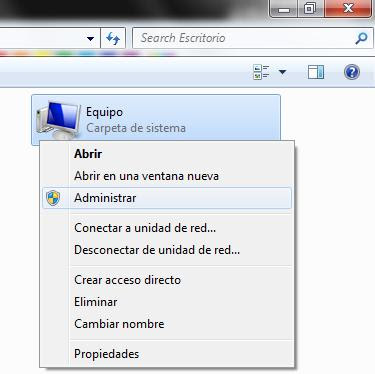
first have to click the right mouse button on "My Computer
" or "
Team" as the name that you may have allocated. And then choose the Manage option.
Then in the window that comes out, choose the option " Computer Management" and wait for it to load all the existing units our PC.
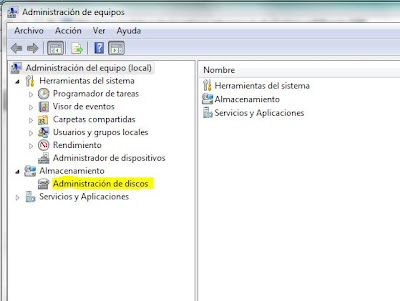
To the right of the window units appear to us that we had in our pc, if bedridden at this point that we had "lost", right-click on it and choose " Change Drive Letter and Paths unity ... "and choose to add a new point with which we enter the unit.

Once done, we again have access to all partitions.
 Now that is slowly running out of summer, no heat, I find this fan with built-in USB memory, no more than a fan-shaped flash drive!. It is made of bamboo, wood and cotton. Contains a 16-GB flash memory capacity, so be careful that you skip the movies in the face, while I abanicais. It costs $ 300 to change 210.4672 € .


